
Accessing MetLife Dental Benefits via Mobile App
This document provides instructions on how to use the MetLife Mobile App to access and manage MetLife Dental ID cards, including downloading the app, registration, and adding the ID to Apple Wallet.
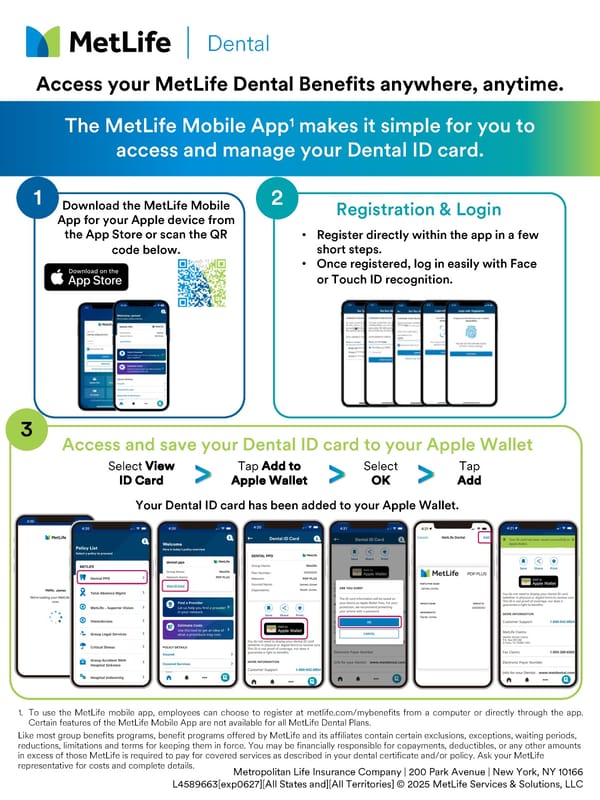
Dental Access your MetLife Dental Benefits anywhere, anytime. The MetLife Mobile App1 makes it simple for you to access and manage your Dental ID card. 1 Download the MetLife Mobile App for your Apple device from the App Store or scan the QR code below. 2 • Register directly within the app in a few short steps. • Once registered, log in easily with Face or Touch ID recognition. Registration & Login 3 Access and save your Dental ID card to your Apple Wallet Select View ID Card Tap Add to Apple Wallet Select OK Tap Add Your Dental ID card has been added to your Apple Wallet. 1. To use the MetLife mobile app, employees can choose to register at metlife.com/mybenefits from a computer or directly through the app. Certain features of the MetLife Mobile App are not available for all MetLife Dental Plans. Like most group benefits programs, benefit programs offered by MetLife and its affiliates contain certain exclusions, exceptions, waiting periods, reductions, limitations and terms for keeping them in force. You may be financially responsible for copayments, deductibles, or any other amounts in excess of those MetLife is required to pay for covered services as described in your dental certificate and/or policy. Ask your MetLife representative for costs and complete details. Metropolitan Life Insurance Company | 200 Park Avenue | New York, NY 10166 L4589663[exp0627][All States and][All Territories] © 2025 MetLife Services & Solutions, LLC
 Accessing MetLife Dental Benefits via Mobile App