
Mobile Benefits Portal Guide
A guide to accessing and managing benefits using the PBA Mobile Benefits Portal, providing instructions for new users to view their virtual ID, download documents, and access support services.
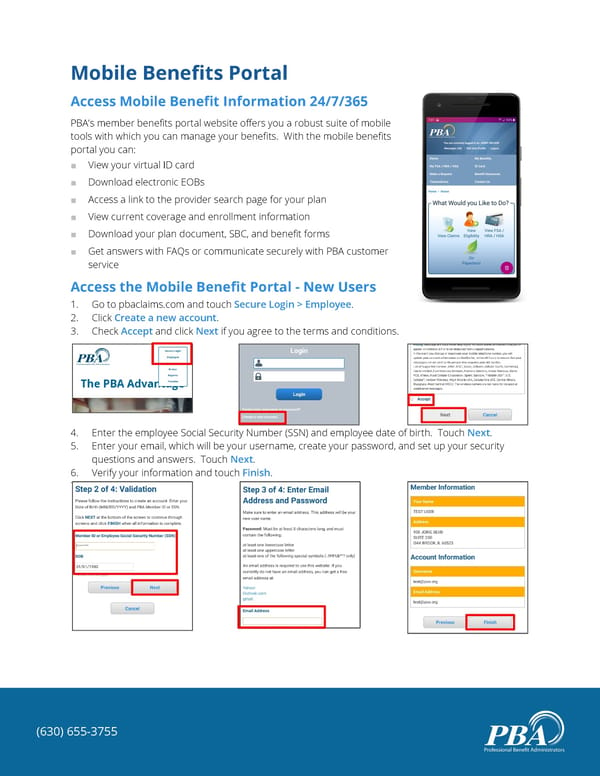
Mobile Benefits Portal Access Mobile Benefit Information 24/7/365 PBA’s member benefits portal website offers you a robust suite of mobile tools with which you can manage your benefits. With the mobile benefits portal you can: ■ View your virtual ID card ■ Download electronic EOBs ■ Access a link to the provider search page for your plan ■ View current coverage and enrollment information ■ Download your plan document, SBC, and benefit forms ■ Get answers with FAQs or communicate securely with PBA customer service Access the Mobile Benefit Portal - New Users 1. Go to pbaclaims.com and touch Secure Login > Employee. 2. Click Create a new account. 3. Check Accept and click Next if you agree to the terms and conditions. 4. Enter the employee Social Security Number (SSN) and employee date of birth. Touch Next. 5. Enter your email, which will be your username, create your password, and set up your security questions and answers. Touch Next. 6. Verify your information and touch Finish. 7. (630) 655-3755
 Mobile Benefits Portal Guide Page 2