
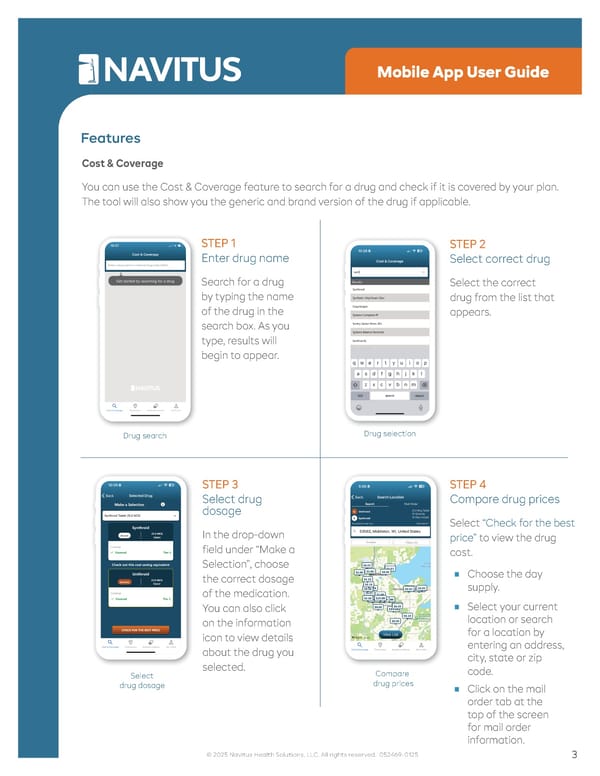
• Tools Mobile App User Guide Features Cost & Coverage You can use the Cost & Coverage feature to search for a drug and check if it is covered by your plan. The tool will also show you the generic and brand version of the drug if applicable. Drug search STEP 1 Enter drug name Search for a drug by typing the name of the drug in the search box. As you type, results will begin to appear. Drug selection STEP 2 Select correct drug Select the correct drug from the list that appears. Select drug dosage STEP 3 Select drug dosage In the drop-down field under “Make a Selection”, choose the correct dosage of the medication. You can also click on the information icon to view details about the drug you selected. Compare drug prices STEP 4 Compare drug prices Select “Check for the best price” to view the drug cost. ■ Choose the day supply. ■ Select your current location or search for a location by entering an address, city, state or zip code. ■ Click on the mail order tab at the top of the screen for mail order information. 3 © 2025 Navitus Health Solutions, LLC. All rights reserved. 052469-0125
 Navitus Mobile App User Guide Page 2 Page 4