
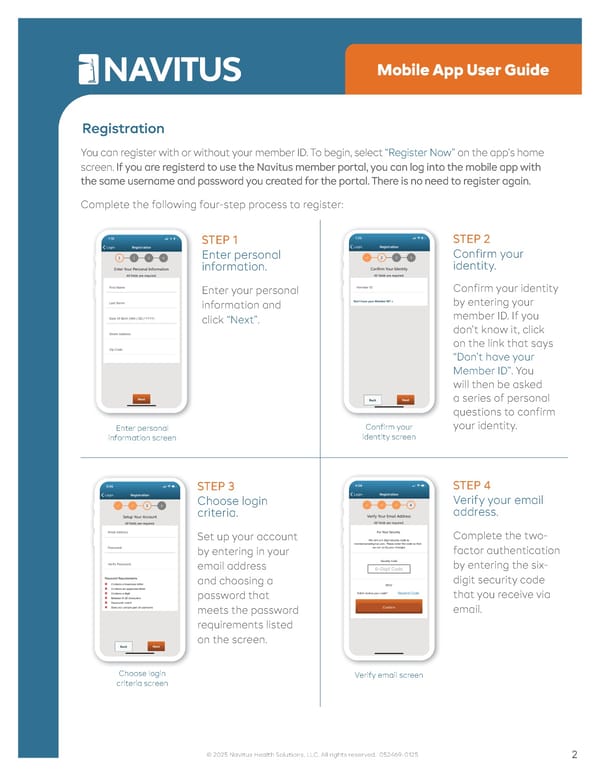
Mobile App User Guide Registration You can register with or without your member ID. To begin, select “Register Now” on the app’s home screen. If you are registerd to use the Navitus member portal, you can log into the mobile app with the same username and password you created for the portal. There is no need to register again. Complete the following four-step process to register: Enter personal information screen STEP 1 Enter personal information. Enter your personal information and click “Next” . Confirm your identity screen STEP 2 Confirm your identity. Confirm your identity by entering your member ID. If you don’t know it, click on the link that says “Don’t have your Member ID” . You will then be asked a series of personal questions to confirm your identity. Choose login criteria screen STEP 3 Choose login criteria. Set up your account by entering in your email address and choosing a password that meets the password requirements listed on the screen. Verify email screen STEP 4 Verify your email address. Complete the two- factor authentication by entering the six- digit security code that you receive via email. 2 © 2025 Navitus Health Solutions, LLC. All rights reserved. 052469-0125
 Navitus Mobile App User Guide Page 1 Page 3